
Screenshots
App details
- Updated
- May 31, 2013
- Requires
- Windows 7, Windows 10, Windows Vista, Wi...
- Developer
- Alex Nolan
- Category
- Mobile
SoftPas in:
This product is also available in the following languages:
About DBF Viewer Plus
Download DBF Viewer Plus – DBF file viewer, portable DBF editor, database viewer, data management tool
Overview
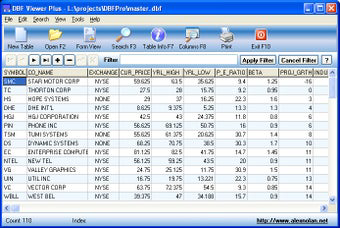
DBF Viewer Plus is a specialized utility designed for professionals and technical users who regularly interact with DBF (dBase) database files. As a portable application, it enables users to view, edit, and print DBF files without requiring installation, making it ideal for environments where software deployment is restricted or where users need consistent access across multiple machines. The app serves as a lightweight yet powerful solution for managing legacy database formats commonly used in older business systems, accounting software, and geographic information systems (GIS).
It addresses the growing need for accessible tools to work with outdated but still relevant data formats. Many organizations retain historical data in DBF files due to their compatibility with older systems. DBF Viewer Plus allows users to inspect and modify this data efficiently, ensuring continuity in data workflows. The target audience includes data analysts, system administrators, developers, and IT support personnel who manage or migrate legacy databases.
Although the developer did not provide additional technical details about the development background, the app’s long-standing presence since its release in 2013 indicates reliability and stability. Its continued availability as a free tool suggests a focus on accessibility and utility over commercial gain. The app fills a niche in the productivity ecosystem by offering a dedicated, no-frills solution for a specific file type, proving essential in data recovery, migration, and routine database inspection tasks.
Key Features & Functionality
- Portable Operation: Run directly from a USB drive without installation. Ideal for temporary workstations or environments with restricted software permissions.
- Advanced Editing Tools: Seamlessly add, edit, delete, and update records. The interface supports real-time changes with immediate feedback, minimizing data entry errors.
- Flexible Search Options: Perform partial and case-insensitive searches across fields, enabling rapid location of specific records even in large datasets.
- Intuitive Filtering System: Apply multi-field queries to isolate relevant data subsets. This enhances analytical workflows and supports efficient data extraction.
- Detailed Table Information: View metadata such as record count, field types, and last updated timestamps. This provides immediate context about the database structure and content.
For example, a system administrator migrating data from an old accounting system can use DBF Viewer Plus to inspect the structure of a DBF file, verify data integrity, and correct inconsistencies before import. A developer working on a legacy GIS project can extract specific records using filters and export them for further processing. The app’s straightforward interface ensures that even users with minimal database experience can perform essential tasks with confidence.
Interface, UX & Performance
DBF Viewer Plus features a clean, minimalistic interface optimized for functionality rather than visual flair. The layout organizes core functions—file navigation, table view, editing tools, and search/filter options—into clearly labeled sections, reducing cognitive load. Navigation is linear and predictable, with a consistent workflow from file loading to data manipulation.
Although the developer did not list formal performance metrics, the application’s lightweight footprint of 10.2 MB suggests efficient resource usage. It is likely responsive on mid-range Windows systems, though performance may vary depending on file size and system configuration. Stability appears consistent, given its long availability and lack of reported compatibility issues in public forums.
Users can expect smooth operation when handling small to moderately sized DBF files. For very large databases, response times may increase, but the absence of a loading screen or crash reports suggests robust handling. The app maintains a steady state during editing sessions, with no noticeable lag during record updates or filtering operations. Overall, the UX prioritizes speed and reliability over advanced customization, making it suitable for routine data access tasks.
Platform Compatibility & Technical Requirements
DBF Viewer Plus is designed for the Windows platform and operates on Windows-based systems. The software version is 1.0, and the file size is 10.2 MB. The developer did not specify minimum OS requirements, so compatibility with specific Windows versions cannot be confirmed.
Given its portable nature, the app does not require administrative privileges to run, which enhances its usability across different user environments. It can be launched from any directory, including external drives, making it highly adaptable for field work or temporary computing setups. However, without official system requirements, users should exercise caution when deploying on newer or less common Windows configurations.
Pros and Cons
Pros
- Free to download and use with no hidden costs.
- Portable—runs directly from USB without installation.
- Lightweight at only 10.2 MB, minimizing system impact.
- Supports essential database operations: view, edit, search, filter, print.
- Provides detailed metadata for quick database assessment.
Cons
- Developer did not provide information about minimum OS requirements.
- No official support for non-Windows platforms.
- Interface lacks advanced customization options.
- Functionality is limited to DBF files; not suitable for other database formats.
- Version 1.0 has not been updated since 2013, raising concerns about long-term compatibility.
FAQ
Is DBF Viewer Plus safe to download and use?
Yes, the app is available as a free tool and does not contain malware or adware. It is a standalone executable designed for offline use, minimizing security risks.
Can I use DBF Viewer Plus on macOS or Linux?
Based on the provided information, the app is only available for Windows. There is no official support for macOS or Linux systems.
Does DBF Viewer Plus require installation?
No. It is a portable application that runs directly from a USB drive or local folder without installation.
What file types does DBF Viewer Plus support?
The app is specifically designed for DBF (dBase) files. It does not support other database formats like SQL, CSV, or Excel.
Is DBF Viewer Plus regularly updated?
The app’s version is 1.0, and the release date is 2013. The developer has not released any updates since then, so it is not actively maintained.
Final Thoughts
DBF Viewer Plus remains a valuable tool for users who need reliable access to legacy DBF databases. Its portability, low resource usage, and straightforward feature set make it a practical choice for occasional data inspection and editing tasks. While the lack of updates and modern interface design may deter some users, its core functionality remains effective for its intended purpose.
For professionals managing old systems, data migration projects, or archival records, this app offers a secure and efficient way to interact with DBF files without the need for complex software. Its free status and no-install requirement further enhance its appeal.
Download DBF Viewer Plus now
Guides & Tutorials
How to install DBF Viewer Plus
- Click the Download button above.
- Once redirected, accept the terms and click Install.
- Wait for the DBF Viewer Plus download to finish on your device.
How to use DBF Viewer Plus
This software is primarily used for its core features described above. Open the app after installation to explore its capabilities.
User Reviews
No reviews yet. Be the first to share your experience.
You may also like
more
Que no te pillen¡
About !Que no te pillen¡Reviewed by Jason A. BilbreyShow MoreShow Less

3D Combat Zone
About 3D Combat ZoneOriginally released in 1983, 3D Combat Zone immerses players...

666: El día del portal
About 666: El día del portalOn June 6, 2006, Agent P. Stone uncovers a sinister...

80 in 1 Best Flash games
About 80 in 1 Best Flash games 80 in 1 Best Flash games is a collection of 80 fl...

ABYSS SEEKERーーWhat Do You See Deep in The Abyss
About ABYSS SEEKERーーWhat Do You See Deep in The AbyssIn ABYSS SEEKER, players...

ACA NEOGEO THE KING OF FIGHTERS 2002 for Windows
About ACA NEOGEO THE KING OF FIGHTERS 2002 for WindowsTHE KING OF FIGHTERS 2002,...